> ## Documentation Index
> Fetch the complete documentation index at: https://docs.corridor.dev/llms.txt
> Use this file to discover all available pages before exploring further.
# Pre-Commit Scanning
> Scan code for security vulnerabilities before every commit so issues are caught before they reach a pull request.
Pre-commit scanning lets Corridor catch security vulnerabilities at the earliest possible moment: before code is committed. A git pre-commit hook runs `corridor scan --staged` on every commit, analyzes the staged changes for security issues, and blocks the commit if any findings are detected. The coding agent or developer can then fix the issue and retry.
This means fewer vulnerabilities make it into pull requests, reducing remediation costs and keeping your codebase cleaner.
## How it works
When a coding agent runs `git commit`, the pre-commit hook kicks in:
1. **Corridor scans the diff.** Corridor's analysis engine evaluates the changes against your team's guardrails and known vulnerability patterns.
2. **Results are returned.** If the scan finds security issues, the commit is blocked and findings are printed in the terminal. If no issues are found, the commit proceeds normally.
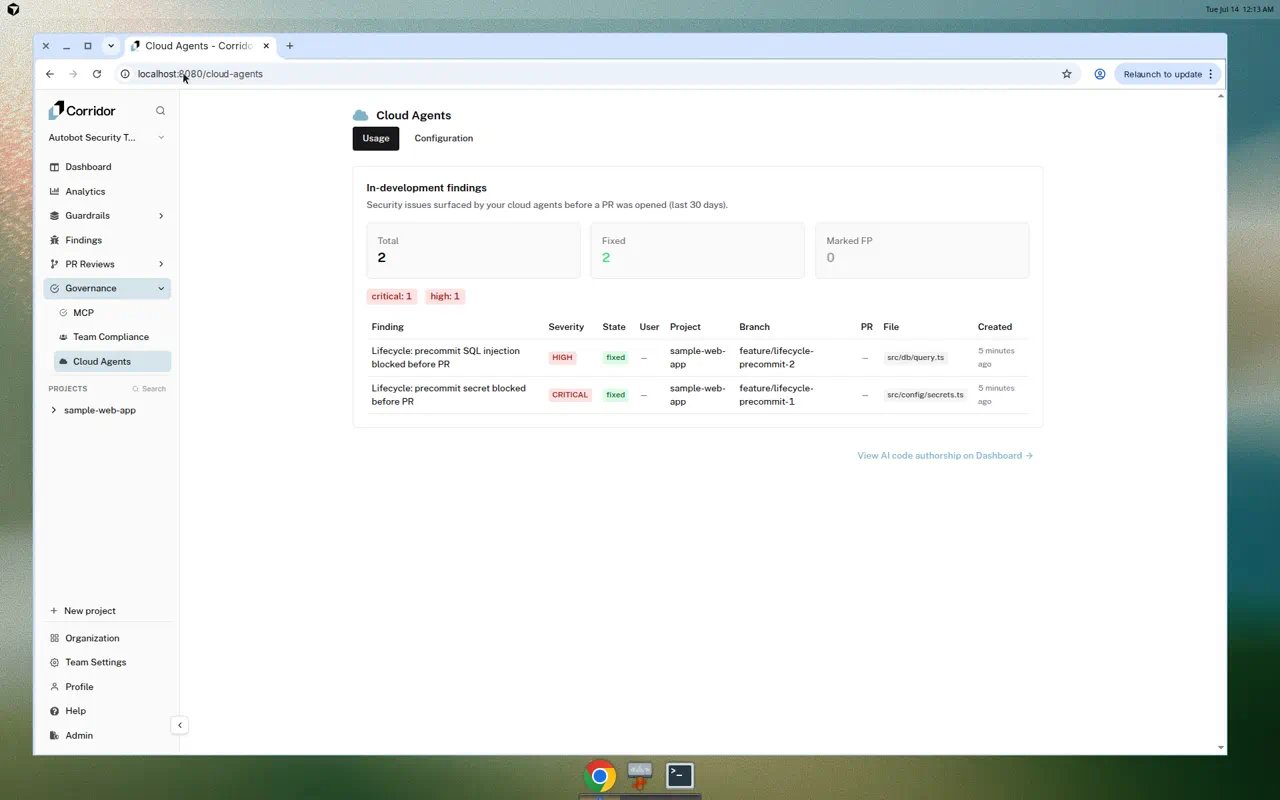
3. **Findings are recorded.** Any findings are saved to the Cloud Agents Usage tab in the Corridor dashboard, where your team can review severity, affected files, and resolution status.
Subsequent commits with the same staged content skip the full scan if all prior findings have been resolved, so developers are not slowed down once issues are fixed.
## Setting it up
Pre-commit scanning is configured through the **Cloud Agents** page in the Corridor dashboard. The setup installs the Corridor CLI and the git pre-commit hook in your cloud agent environment so every session is protected automatically.
For step-by-step setup instructions, see the [Cursor Cloud Agents](/cloud-agents/cursor) guide.
Pre-commit scanning is currently available for Cursor Cloud Agents. Support for additional cloud agents (Codex, Devin, Claude Code) is coming soon.
## What it looks like
### In the dashboard
Findings from pre-commit scans appear on the **Cloud Agents** page under the **Usage** tab. This view shows all in-development findings from the last 30 days, including:
* **Summary cards** with total findings, fixed count, and false positive count
* **Severity breakdown** showing how many findings fall into each severity level
* **Findings table** with columns for the finding title, severity, state, user, project, branch, associated PR, affected file, and creation date
Click any finding to open its detail view, where you can see the full description, affected code, and remediation guidance.
 ## Pausing the scan
Team owners can temporarily stop the pre-commit scan from blocking commits without removing the hook from the agent environment.
To pause:
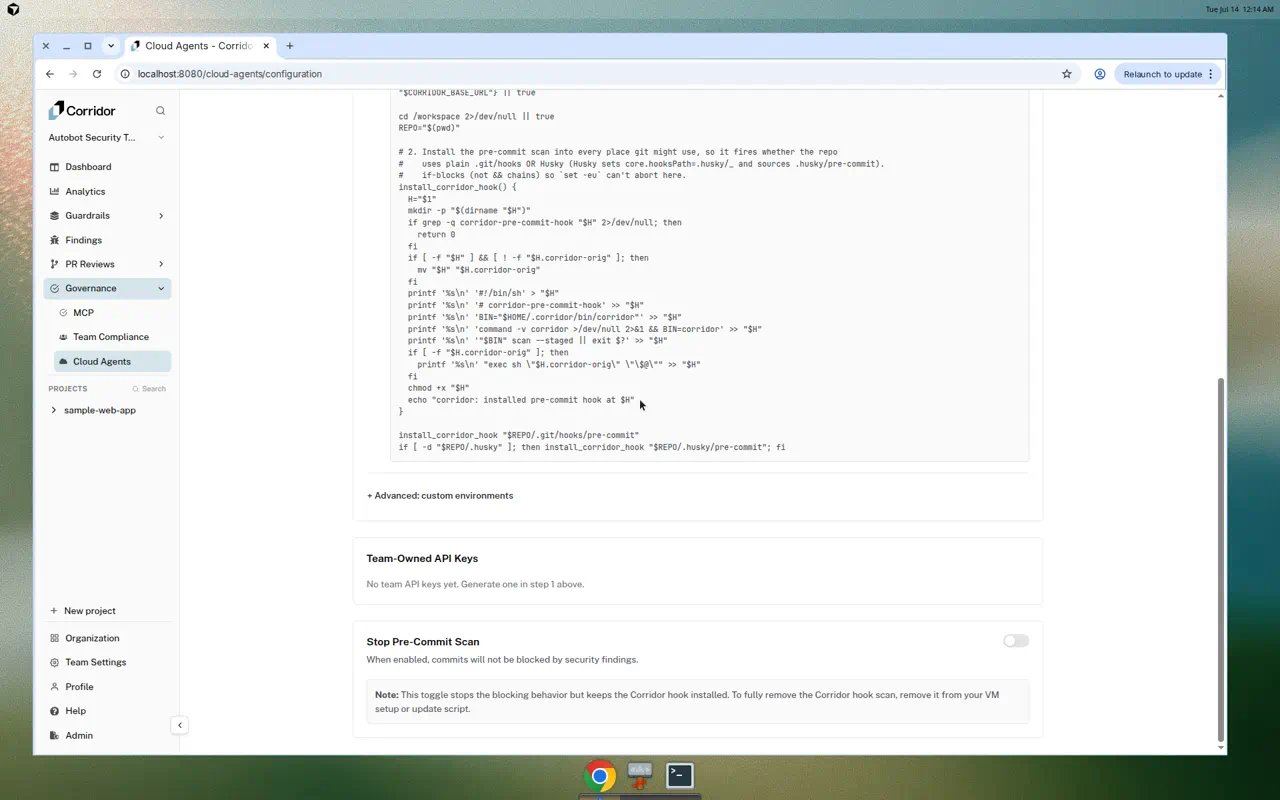
1. Go to **Governance > Cloud Agents** in the Corridor dashboard.
2. Open the **Configuration** tab.
3. Toggle **Stop Pre-Commit Scan** to on.
While paused, the hook remains installed but commits are no longer blocked. Toggle it off to resume scanning.
## Pausing the scan
Team owners can temporarily stop the pre-commit scan from blocking commits without removing the hook from the agent environment.
To pause:
1. Go to **Governance > Cloud Agents** in the Corridor dashboard.
2. Open the **Configuration** tab.
3. Toggle **Stop Pre-Commit Scan** to on.
While paused, the hook remains installed but commits are no longer blocked. Toggle it off to resume scanning.
 ## Bypassing the hook
Individual developers can skip the pre-commit scan for a single commit by passing the `--no-verify` flag:
```bash theme={null}
git commit --no-verify -m "your commit message"
```
This bypasses all git hooks, including the Corridor scan. Use this sparingly and only when you have a good reason to skip the check.
## Next steps
Set up Corridor with your Cursor Cloud Agents.
Configure the security rules that scans enforce.
Learn how to review and resolve security findings.
Automated security reviews on pull requests.
## Bypassing the hook
Individual developers can skip the pre-commit scan for a single commit by passing the `--no-verify` flag:
```bash theme={null}
git commit --no-verify -m "your commit message"
```
This bypasses all git hooks, including the Corridor scan. Use this sparingly and only when you have a good reason to skip the check.
## Next steps
Set up Corridor with your Cursor Cloud Agents.
Configure the security rules that scans enforce.
Learn how to review and resolve security findings.
Automated security reviews on pull requests.