> ## Documentation Index
> Fetch the complete documentation index at: https://docs.corridor.dev/llms.txt
> Use this file to discover all available pages before exploring further.
# Blocking PRs
> Turn Corridor's PR security review into a required status check so pull requests with unresolved findings can't be merged until they're addressed.
Blocking PRs is currently in **beta** and is available on GitHub (GitLab support is on the roadmap). To request access for your team, contact [support@corridor.dev](mailto:support@corridor.dev).
Blocking PRs lets Corridor act as a required status check on your pull requests. Code with unresolved security findings can't be merged until it's addressed, bringing security enforcement directly into your existing workflow.
## Prerequisites
* [Pull Request Reviews](/features/pr-reviews) enabled for your team
* GitHub [connected](/onboarding/connecting-github) to Corridor
* Permission to edit branch protection or rulesets on the repository you want to protect
## How it works
When a pull request is opened or updated, Corridor reviews the changes and posts any security findings as inline comments. A single **Corridor Review** check reflects the result:
* **Passing** — no open findings at your configured blocking severities.
* **Failing** — one or more findings need attention. If the check is required in branch protection, the merge is blocked until they're resolved.
You control what blocks: choose which severities gate a merge (for example, **Critical** and **High**), while lower-severity findings are surfaced for visibility without blocking. To keep noise low, Corridor filters out likely false positives before they ever reach a PR, so the findings you see are the ones worth your attention.
## Clearing the check
Developers can clear the check in whatever way fits the situation, all from the PR:
* **Fix the code** — push a fix and Corridor automatically re-verifies the finding and clears the check once it's resolved. No manual step required.
* **Mark a false positive** — reply `false positive` on the finding's inline comment to dismiss it, with the decision recorded.
* **Accept the risk (unblock)** — reply `unblock` to override a specific finding when your team decides to proceed.
* **Adjust from the dashboard** — security teams can change a finding's severity or resolve it centrally, and the check updates automatically.
See [Replying to Corridor's comments](/features/pr-reviews#replying-to-corridors-comments) for more on the reply workflow.
## Setting it up
There are two steps: choose your blocking rules in Corridor, then require the check in GitHub. Both are required — Corridor reports the pass/fail signal, and branch protection is what turns that signal into enforcement.
### 1. Choose your blocking rules in Corridor
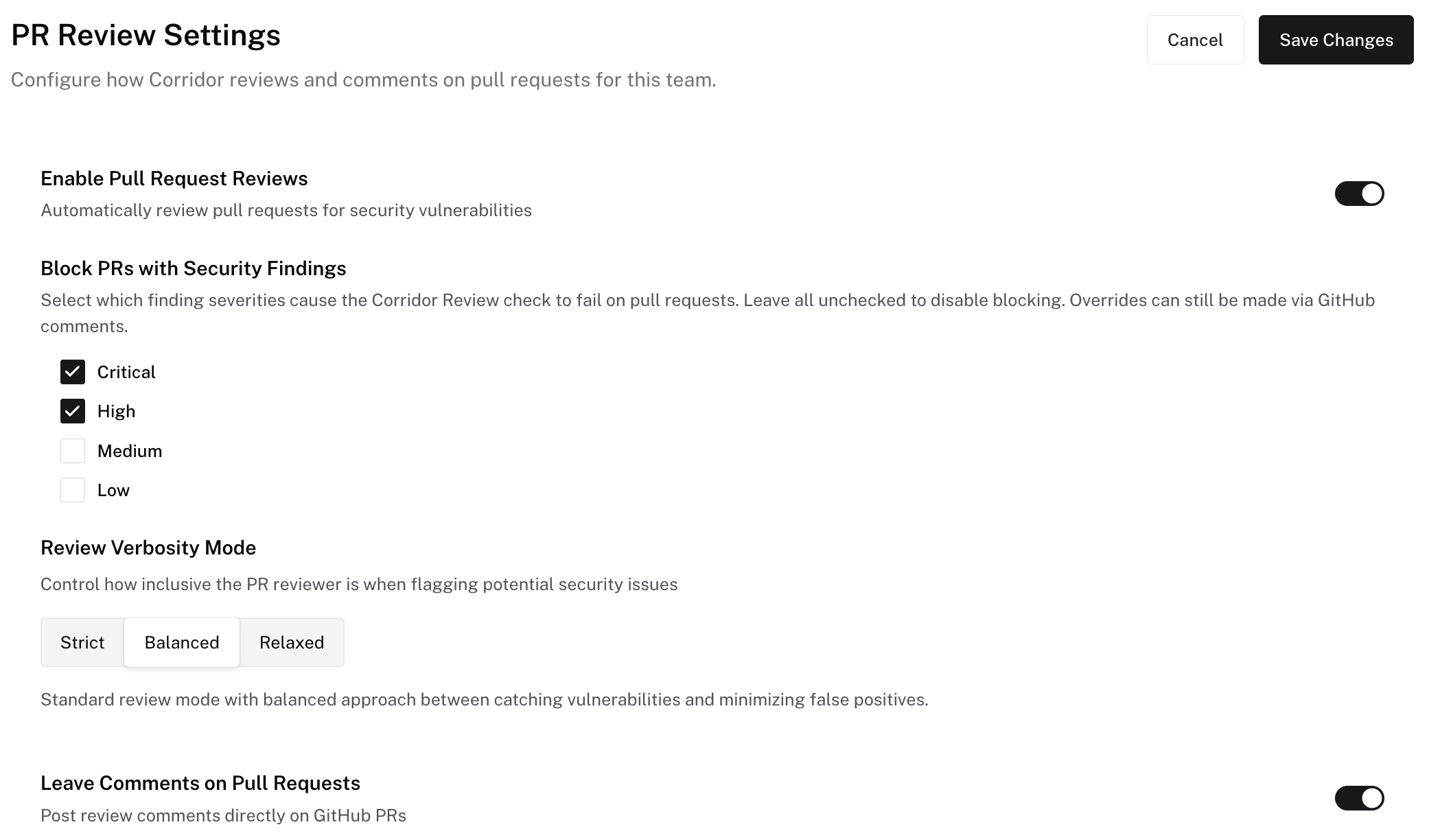
On the **PR Reviews** page, open **Settings** and:
1. Ensure **Enable Pull Request Reviews** is on.
2. Under **Block PRs with Security Findings**, check the severities that should block a merge (for example, **Critical** and **High**). Leaving every severity unchecked disables blocking.
3. Ensure **Leave Comments on Pull Requests** is on.
Findings at severities you leave unchecked are still surfaced on the PR for visibility without blocking the merge. Blocking severities are a **team-wide** setting—they apply to every project on the team and can't be overridden per project.
 ### 2. Require the check in GitHub
This is the step that enforces the block — on its own, the Corridor Review check reports pass/fail but does not prevent merges.
1. Go to repository **Settings → Branches → Add branch protection rule** (or edit an existing rule).
2. Set the **Branch name pattern** to your protected branch (for example, `main`).
3. Enable **Require status checks to pass before merging**.
4. In the search box that appears, find and select **Corridor Review**.
5. Save changes.
1. Go to **Settings → Rules → Rulesets → New branch ruleset** and target your branch(es).
2. Under **Require status checks to pass**, click **Add checks**, search **Corridor Review**, and add it.
3. Set the ruleset to **Active** and save.
GitHub only lists a status check once it has run at least once (recently). If **Corridor Review** doesn't appear in the search, open or update a PR so the check runs, then it'll be selectable.
Without step 2, the Corridor Review check still runs and reports pass/fail on every PR, but GitHub won't prevent merges — branch protection is what turns the signal into enforcement.
## Next steps
How Corridor reviews pull requests and how to reply to findings
Track and manage security findings
### 2. Require the check in GitHub
This is the step that enforces the block — on its own, the Corridor Review check reports pass/fail but does not prevent merges.
1. Go to repository **Settings → Branches → Add branch protection rule** (or edit an existing rule).
2. Set the **Branch name pattern** to your protected branch (for example, `main`).
3. Enable **Require status checks to pass before merging**.
4. In the search box that appears, find and select **Corridor Review**.
5. Save changes.
1. Go to **Settings → Rules → Rulesets → New branch ruleset** and target your branch(es).
2. Under **Require status checks to pass**, click **Add checks**, search **Corridor Review**, and add it.
3. Set the ruleset to **Active** and save.
GitHub only lists a status check once it has run at least once (recently). If **Corridor Review** doesn't appear in the search, open or update a PR so the check runs, then it'll be selectable.
Without step 2, the Corridor Review check still runs and reports pass/fail on every PR, but GitHub won't prevent merges — branch protection is what turns the signal into enforcement.
## Next steps
How Corridor reviews pull requests and how to reply to findings
Track and manage security findings